Excel攻略
powerquery分组聚合、字符拼接
let 源 = Excel.CurrentWorkbook(){[Name="表1"]}[Content], fx=(x as list)=>Text.Combine(List.Transform(x,each Text.From(_)),","), data=Table.G
 2020-07-08

【数据分析】Microsoft Power BI Desktop
简介 Power BI是微软的一个商业数据分析工具,可以汇聚各种类型的数据,从各个维度深入分析,产生漂亮报表系统,为管理服务。 使用 我们先直接从Excel导入数据,点击 开始 => 获取数据 => Excel 选择Excel文件后,选中要导入的表格,点击加载 制作
2019-09-24

access合并多个表
select * into sheet10 from (select * from sheet1 union all select * from sheet2 union all select * from sheet3 union all select * from sheet4
2019-09-24
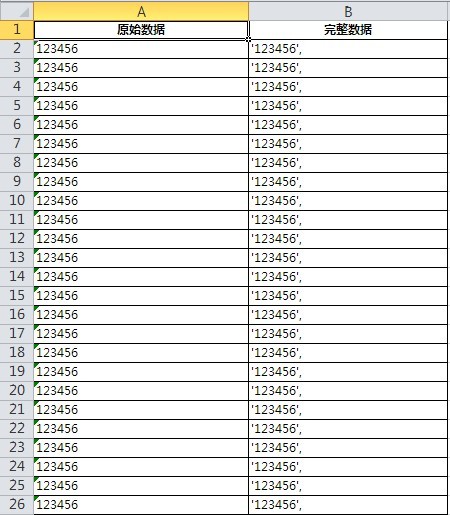
Excel批量给数据添加单引号和逗号
教程 A2表格暂时为空,模板建立完成以后,用来放置原始数据; 在B2表格内输入公式: ="'"&A2&"'"&"," 敲击回车; 解释 B2表格的公式"'"&A2&"'"&","中,"'"表示数据左上角的单引号,在Excel表格中需要用
2019-09-23

对Excel中的UrL进行Decode
Function URLDecode(ByVal strIn) URLDecode = "" Dim sl : sl = 1 Dim tl : tl = 1 Dim key : key = "%" Dim kl : kl = Len(key) sl = InStr(sl, strIn,
2018-01-24
破解Excel表密码保护
Public Sub AllInternalPasswords() ' Breaks worksheet and workbook structure passwords. Bob McCormick ' probably originator of base code algorithm mo
2018-01-24
一个工作薄按照固定数量分割成N个工作薄
Sub 分表() Dim cellall As Integer FILENAMEA = ThisWorkbook.Name Windows(FILENAMEA).Activate Application.ScreenUpdating = False '关闭屏幕刷新 Applicatio
2018-01-24
合并多个工作薄为一个工作薄下的多个工作表
Sub 汇总多个工作表() '定义对话框变量 Dim fd As FileDialog Set fd = Application.FileDialog(msoFileDialogFilePicker) '新建一个工作簿 Dim newwb As Workbook
2018-01-24
合并当前目录下所有工作簿
Sub 合并当前目录下所有工作簿的全部工作表() Dim MyPath, MyName, AWbName Dim Wb As workbook, WbN As String Dim G As Long Dim Num As Long Dim BOX As String Applicati
2018-01-24